Google Demand Gen campaigns can now be
uploaded directly to the Template Library
from Ad Manager.This allows users to convert existing Demand Gen campaigns into reusable templates and replicate campaign setups across locations without rebuilding them from scratch.
What’s New?
- Upload to Template Libraryis now available for Google Demand Gen campaigns.
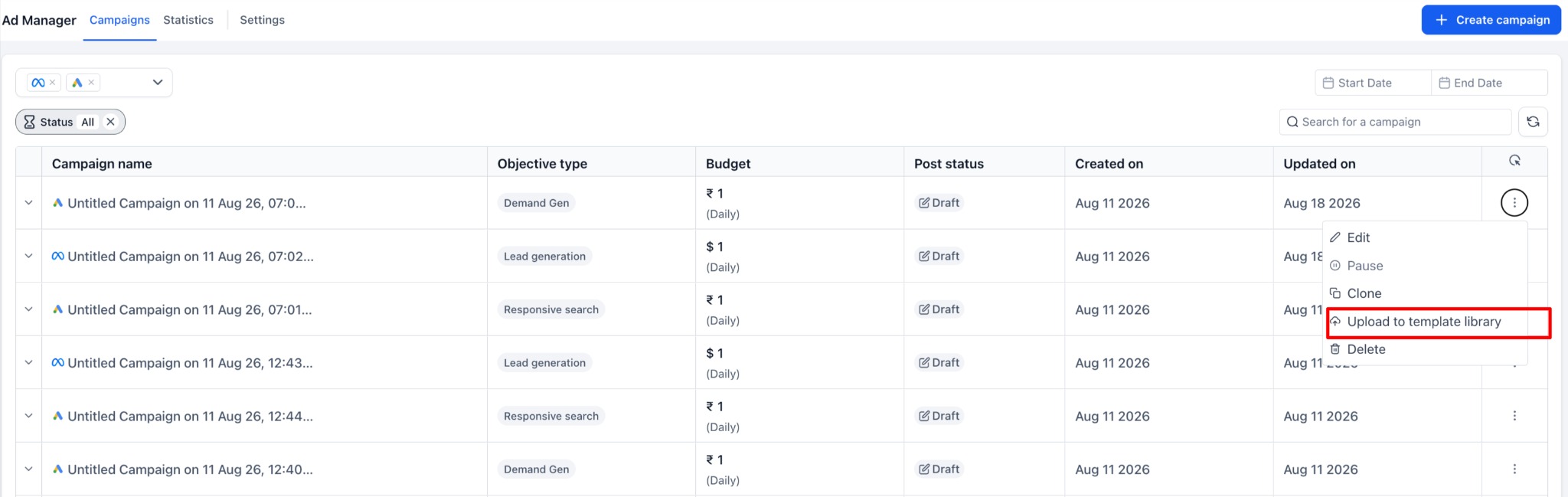
- Users can upload an existing campaign directly from the campaign-level ellipsis menu.
- Uploaded campaigns are saved as Draft templatesfirst.
- Templates can be reviewed, edited, and published for future reuse.
How to Use?
- Go to Ad Manager > Campaigns.
- Locate the Google Demand Gen campaign.
- Click the ellipsis(⋮) menu.
- Select Upload to Template Library.
- Add the Template NameandCategory.
- Upload the campaign.
- Review the draft template and publish it when ready.
Why It Matters
- Reuse proven Demand Gen campaign setups.
- Reduce repetitive campaign configuration.
- Standardize campaigns across multiple locations.
- Extend the existing Template Library workflow to Google Demand Gen campaigns.
Notes
- Uploaded campaigns are created as Draft templatesbefore publishing.
- Existing Template Library workflows remain unchanged.
- This release specifically adds Template Library upload support for Google Demand Gen campaigns.
Was this article helpful?
That’s Great!
Thank you for your feedback
Sorry! We couldn't be helpful
Thank you for your feedback
Feedback sent
We appreciate your effort and will try to fix the article