Added QR code sharing directly inside Funnel Builder so you can create and download a QR code for the current funnel step without leaving your workflow.
What’s improved
You can now generate a QR code directly from Funnel Builder.
The QR code is automatically linked to the current funnel step.
You can download the QR code in PNG, SVG, or PDF.
You can also choose Edit QR to open more customization options.
The QR code option only appears when a domain is connected or hosted.
How to access
Open a funnel in Funnel Builder.
Locate the Funnel URL at the top of the page.
Click the QR code icon next to the URL.
Download the QR code or select Edit QR to customize it further.
Why it matters
Saves time by removing extra steps.
Reduces the chance of linking the wrong page or step.
Makes it easier to promote funnels through print, events, packaging, signage, and other offline channels.
Brings QR code creation into the same place where you build your funnel.
Media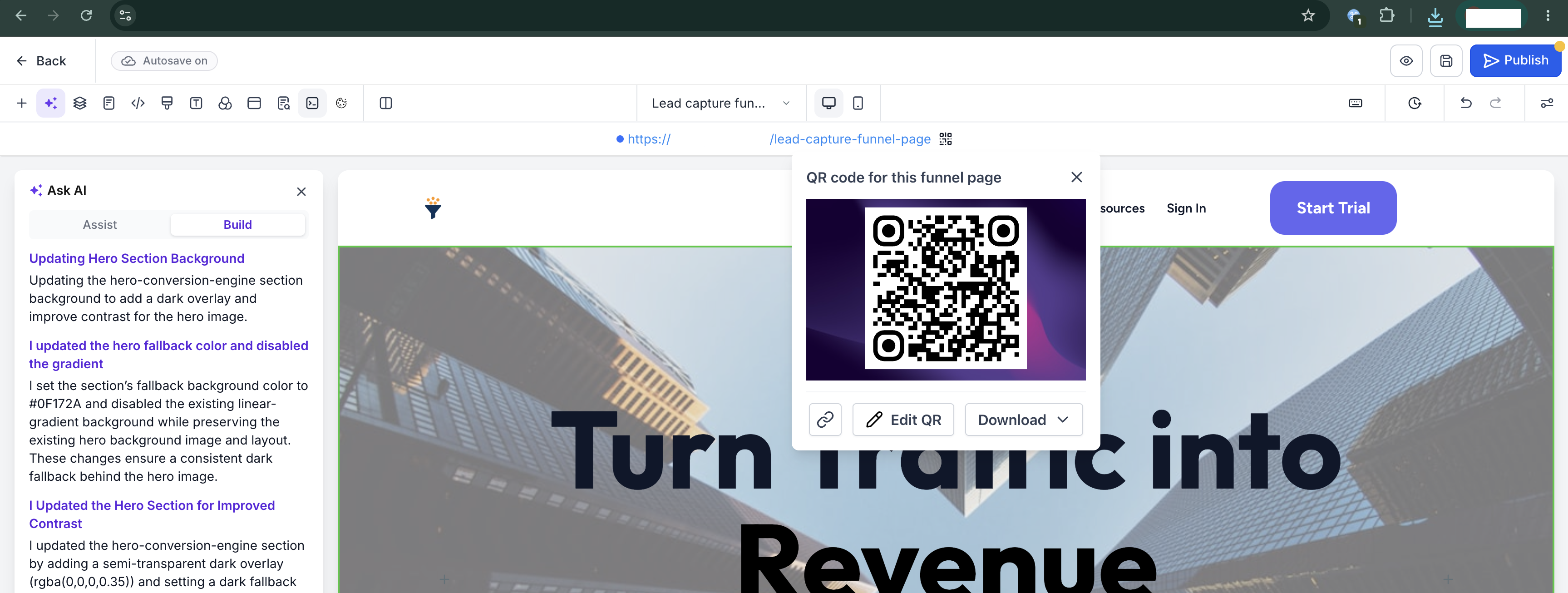
Was this article helpful?
That’s Great!
Thank you for your feedback
Sorry! We couldn't be helpful
Thank you for your feedback
Feedback sent
We appreciate your effort and will try to fix the article